










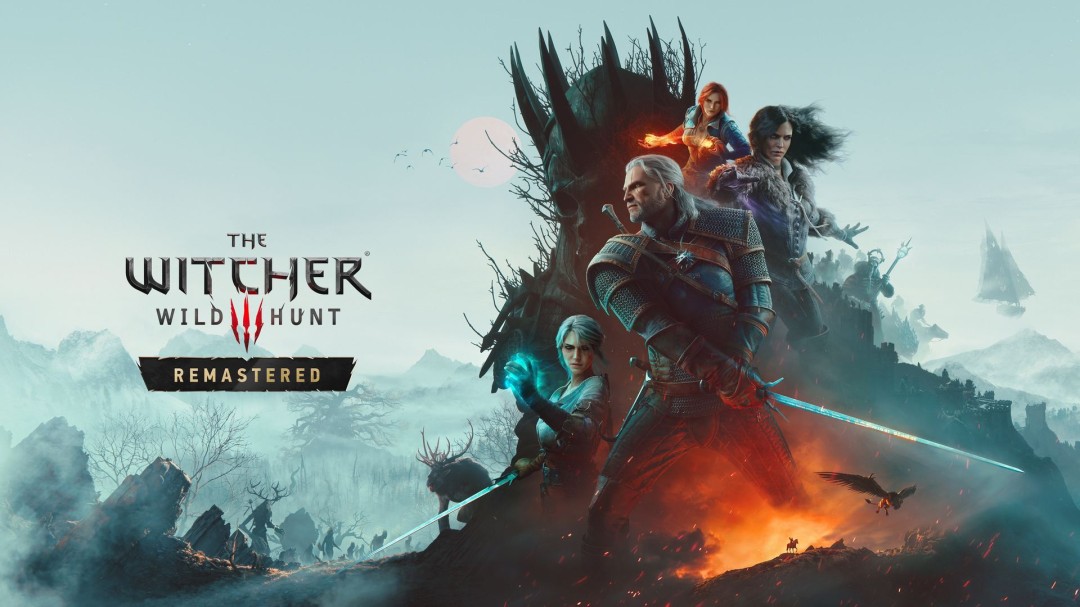
CDPR's game "Witcher 3: Wild Hunt - Remastered" is launched today, and players who own the original game can upgrade for free. This version brings a series of improvements, including enhancements to graphics and gameplay among other aspects.
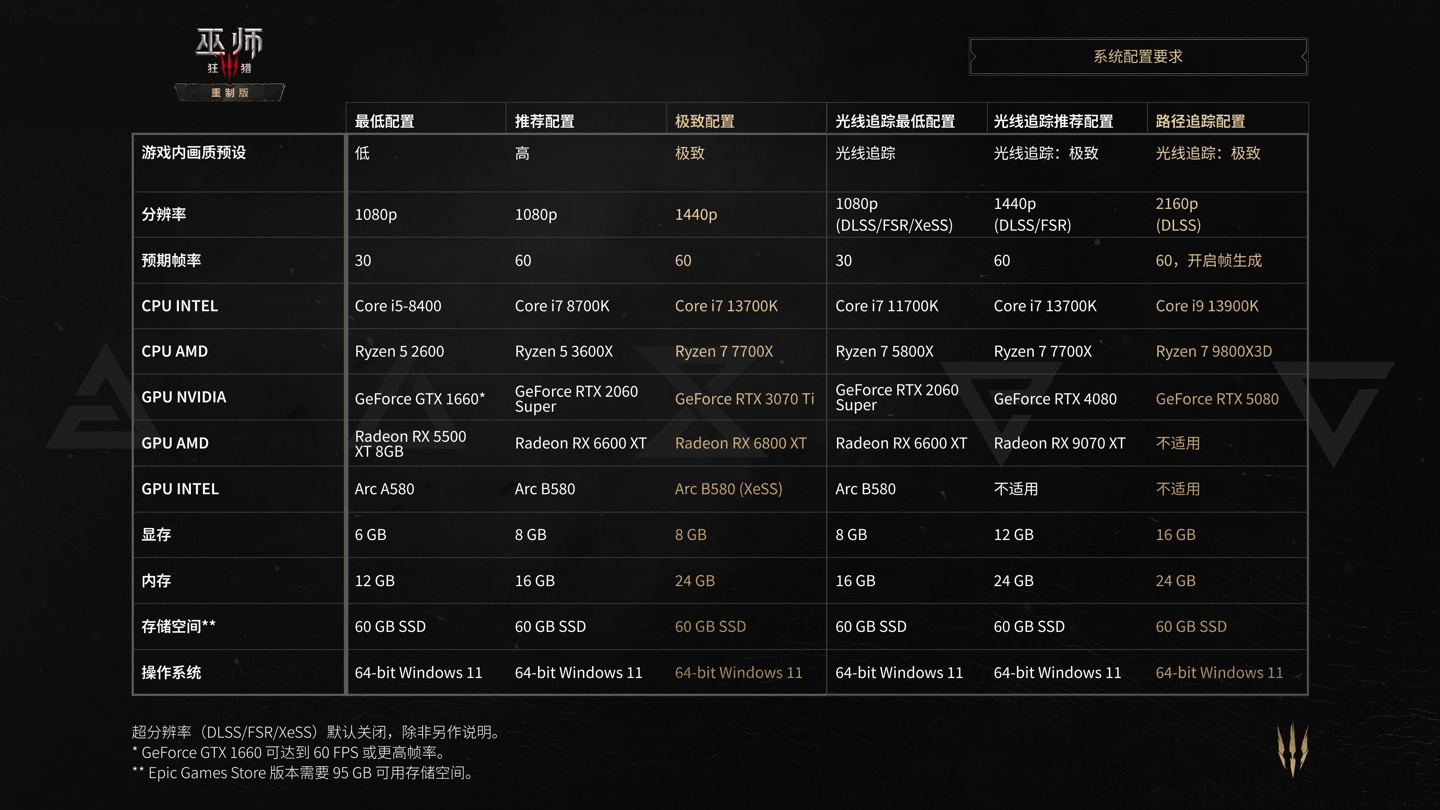
Due to the significant upgrades in this remastered version, the configuration requirements for the PC version have also been updated accordingly. Please refer to the image below to understand the latest system configuration requirements:
IT Home's upgrade overview is as follows:
Graphics and Rendering
- Integrates an optimized coloring model.
- Based on the high-definition remaster project of "The Witcher 3," a large number of textures and models have been updated.
- Optimized the lighting and coloring effects of grasslands and vegetation.
- Updated the visual effects of French and Indian styles, including their upgraded versions.
- New visual effects have been added to the skills.
- The game now supports native DirectX 12 rendering and is equipped with multi-threading technology, providing enhanced performance and visual quality.
- Updated the tone mapping to optimize color, lighting, contrast, and detail representation.
- Add GTAO (real environment light occlusion) as a new optional solution for screen space ambient light occlusion.
- Updated the HDR calibration panel, with new options and other optimizations added.
- Add local shadows with ray tracing.
- Update the screen space reflection effect.
- Update the screen space shadow effect.
- Optimized dynamic blur for better effects and a stronger cinematic feel.
- Update the subsurface scattering effects to make the character skin appear more natural.
- Improve terrain and material rendering to make the performance of lighting, shadows, reflections, and highlights more natural.
- Introducing a brand-new image-based lighting (IBL) system to improve environmental lighting and reflection performance in various settings.
- Replicate the floodlight (Bloom) effect to further enhance lighting performance in various environments.
How to Play
- The skill system has been optimized. Now, skills are integrated into a skill tree, with each skill having three levels. Unlocking new skills no longer requires a fixed number of skill points; instead, it depends on unlocking the prerequisite skills first. Important note: Due to this change, your skill points have been reset.
- Balance adjustments have been made to the skill tree, optimizing the skill bonus values, effects, and synergistic benefits.
- Some skills have been renamed to better reflect their effects.
- You can now remold equipment to change its appearance without affecting its properties. Only master craftsmen (Yuna and Hatoli) provide this service. Add the new equipment and the crafting blueprint to your inventory to unlock the new appearance. The equipment dyeing effects from "Blood and Wine" can be retained on the remolded equipment.
- Optimized the combat behavior of non-leader monsters, including attack patterns, counterattacks, movement, reactions, fleeing, and effect application.
- Add a new slider called "Horse Control Input Sensitivity" under Settings → Controls.
- Optimized the movement of Radish and Jelot, as well as player control and animations.
Interface and Interaction Experience
- Meditation now uses a more immersive animation of time passing to replace the original UI interface.
- The skill interface has now been integrated into a more intuitive skill tree.
- Updated map interface, making it more convenient to switch between tracked tasks. Newly added exclusive markers for untracked tasks; simply select them to start tracking.
- The maximum number of markers that can be displayed on the map has been increased.
- Add new map markers.
- Now, in Settings → Video → Interface, you can choose to hide herbs, boats, and corpses on the minimap to reduce visual clutter and make the interface more concise.
- Optimization task reminder: Integrate multiple task updates into one HUD reminder.
- Loot from nearby battles can now be displayed in a single window interface, eliminating the need to switch between multiple loot screens. This feature can be enabled by going to Settings → Gameplay.
- New loot tips: Items picked up recently will be displayed on the left side of the screen. This feature can be turned off in Settings → Gameplay.
- Item tips have been added to the loot window, allowing for a preview of item details before pickup.
- Change the setting " HUD Configuration" to "Interface".
- Updated the CD PROJEKT RED account connection, "My Rewards," and data collection permission menu.
Photography mode
- The user interface for the photography mode has been updated, with a large number of new functions and options added.
- Now, it is possible to select multiple different characters to join the filming scene.
- Added multiple poses and expressions for Geralt and playable characters.
- Add a confirmation prompt before exiting the photo mode to prevent accidental exit.
- Now it is possible to lock the lens position in photo mode, making it easier to capture stunning moments.
- New option added, allowing for the application of multiple preset environments to scenarios.
- Newly added lens preset saving function, which allows for saving and reusing lens positions and angles.
- It is now possible to modify the aspect ratio of the screenshot.
- Added a first-person camera mode switch, allowing you to observe the world through Jerot's perspective.
- It is now possible to enable or disable collisions between the camera and objects as well as walls.
- Adjust the weather and time to create the scene in your mind.
- It is possible to adjust the intensity of weather effects such as rainy days or storms.
- New option added: allows the activation of a three-line dividing line under various screen aspect ratios, and also provides the option to add movie black borders.
- The camera coordinates will be displayed in the user interface.
- New option available to hide the surrounding NPC.
- New props can be placed now, providing more options for creating ideal scenarios. Don't ask where they come from.
- When using the mouse on the PC platform, the pointer will be displayed in photo mode.
Auxiliary Functions
- A new auxiliary function interface has been added to set the menu, and the original auxiliary options have been moved to this interface.
- New bard song preset options have been added. When starting a new game at the "Just follow the plot!" difficulty level or during gameplay, you can enable this preset by going to the assist functions interface. This preset is designed to reduce the cognitive burden on players and is suitable for those who tend to get easily mentally exhausted or have difficulty concentrating. It simplifies certain mechanisms, disables some features, and streamlines the gameplay experience, providing a smoother and more focused adventure. You can activate this preset in the assist functions interface and customize it by toggling the following options.
Experience Optimization
- The tutorial has been simplified to focus on the core game mechanics, making the content more concise.
- Added a new option to quickly withdraw from battle. Hold down the dodge key ( Alt /〇/B) to unlock the target, then press the run key ( L Shift /X/A) to withdraw from battle.
- Now, there's no need to dismount or leave the ship in order to pick up the loot.
Module
- New cross-platform mod support has been added. This in-game tool, provided by mod.io, allows you to conveniently browse and install player-made mods to customize your game. You can find this tool in the mods section of the main game menu. Log in to your CD PROJEKT RED account and bind it to mod.io to start browsing mods. Visit here for more information about the mod manager.
- Optimizations have been made to REDkit in terms of the engine, user interface, and other aspects, to facilitate module creators in creating, managing, and customizing content.
Issue Fix
- Fixed the issue where it was not possible to adjust the right joystick sensitivity when directly entering settings from the main menu.
- The joystick sensitivity can now be set to 0.69.
- Fixed an issue where the host platform sometimes failed to display the HDR settings.
- The light and shadow of the Eternal Flame – Fixed an issue where the "Abandoned Wolf Sect Equipment Blueprint" did not appear in the user interface after being obtained as a reward.
- Wine is sacred – A fix has been made to the issue where rapid teleportation outside of Taustent during the task objective "Search for a wine cellar with Anna Henrietta" would cause the task progress to be blocked. This fix is not retroactive, and affected players will need to reload a save from before the issue occurred.
Others
- Added Ukrainian language localization.
PC Exclusive to the Platform
- Important note: Please make sure that you have installed the latest graphics card driver. Visit NVIDIA, AMD, and Intel to obtain it.
- Added support for path tracking.
- Added support for NVIDIA DLSS 4.5, with a light reconstruction function included.
- Added support for AMD FSR 4, which includes frame generation and Anti-Lag 2 functions. FSR 4 is compatible with AMD Radeon RX 7000, Series, and updated graphics cards. Graphics cards that do not support this function will use FSR 2.
- Added support for Intel XeSS 2.0, including frame generation and low-latency features.
- Added ray-traced hair rendering to improve the lighting and shading effects of hair.
- Added support for tactile feedback on the DualSense controller.